Milesight Gateway UG65-868M
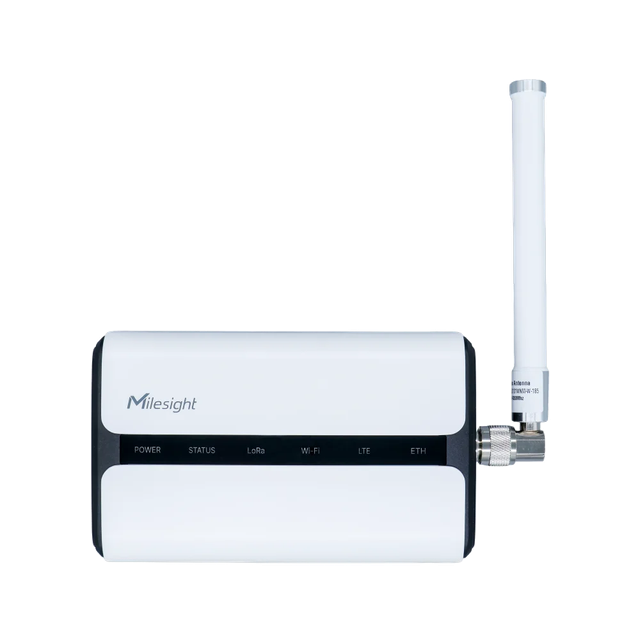
Milesight UG65 is a semi-industrial LoRaWAN® gateway powered by the SX1302 chipset with 8-channel support. It allows Ethernet/PoE deployment, offers high node capacity, and is suitable for smart building and industrial applications.
Integration Links
Connectivity
| Type | Value |
|---|---|
| Wi-Fi | Default SSID: Gateway_**** / Password: iotpassword |
| Access URL | http://192.168.1.1 |
| Login | admin / password |
Network configuration
Initial Setup:
- Power up the gateway via PoE or power adapter
- Connect to the gateway's Wi-Fi network:
- SSID: Gateway_**** (shown on device label)
- Password: iotpassword
- Open web browser and go to http://192.168.1.1
- Log in with: admin / password
General settings
Before configuring packet forwarding, set up the basic system parameters via the gateway's web interface.
System → General Settings
Set the Hostname to the device ID printed on the device label (e.g., ER10G-XXXX-XX).
| Setting | Value |
|---|---|
| Hostname | Device ID from label (ER10G-XXXX-XX) |
System → Time
Configure the gateway's time zone and enable NTP synchronization.
| Setting | Value |
|---|---|
| Time Zone | 1 Czech Republic (Prague) |
| Enable NTP Server | True |
System → User Management
Change the default credentials to secure the gateway.
| Setting | Value |
|---|---|
| Username | (set a new username) |
| Password | (set a strong password) |
Network → Interface → WLAN
Disable the gateway's Wi-Fi access point.
| Setting | Value |
|---|---|
| Enable | False |
This disables the Wi-Fi access point used to connect to the gateway's web interface. Make sure you have working access via Ethernet before disabling it.
Packet forwarding (CUPS)
The gateway comes with a default destination that cannot be modified. You must disable this default destination and create a new one as described below.
What is CUPS? CUPS (Configuration and Update Server) automatically configures your gateway. You only need to upload the CUPS key, and the gateway will download all other settings automatically.
Setup Steps:
- In the gateway web interface, disable the default destination (ID: 0)
- Create a new destination with the following settings:
| Setting | Value |
|---|---|
| Enable | True |
| Type | The Things Industries |
| Protocol | CUPS |
| Server address | hardwario-com.eu1.cloud.thethings.industries |
| CA File (*.pem) | Download from TTI root certificates |
| Client key file | Upload the cups.key generated in your The Things Stack account |
Important:
- Upload only the CUPS key (
cups.key) - The gateway will automatically download the LNS (LoRaWAN Network Server) configuration
- No need to manually configure LNS settings
Power supply
| Type | Value |
|---|---|
| Power | PoE or power adapter |
If the gateway is powered via the RJ45 Ethernet cable with PoE, do not connect an external power adapter at the same time. Using both power sources simultaneously can damage the device.
Technical Specifications
| Parameter | Value |
|---|---|
| Hardware System | |
| CPU | Quad-core 1.5 GHz ARM Cortex-A53 |
| Memory | 512 MB DDR4 |
| Flash | 8 GB eMMC |
| LoRaWAN® | |
| Channels | 8 (half/full duplex) |
| Antennas | 2 × Internal + 1 × N-Female external |
| Frequency | CN470 / IN865 / EU868 / RU864 / US915 / AU915 / KR920 / AS923-1&2&3&4 |
| Tx Power | 27 dBm |
| Sensitivity | -140 dBm @292bps |
| Protocols | V1.0 / V1.0.2 Class A/B/C |
| Supported Devices | ~2000 (10 min uplink) |
| Features | Packet filter, Noise analyzer, Retransmission, FUOTA, Multicast |
| Interfaces | |
| Ethernet | 1 × RJ45 (10/100/1000 Mbps, PoE) |
| Wi-Fi | 802.11 b/g/n (2.4 GHz) |
| Cellular (opt.) | 4G LTE |
| USB | 1 × USB-C (power/console) |
| Reset Button | Yes |
| LEDs | Power, Status, LoRa, Wi-Fi, LTE, ETH |
| Network | |
| Protocols | MQTT, HTTP(S), Modbus TCP, BACnet/IP, VPN (IPSec, OpenVPN, WireGuard…) |
| Management | Web, CLI, SNMP, API, DeviceHub |
| Reliability | WAN failover |
| Power | |
| Supply | DC 9–24 V / PoE / 5V USB-C |
| Consumption | 2.9 W typ., 4.2 W max |
| Physical Characteristics | |
| Dimensions | 180 × 110 × 55.5 mm |
| Weight | 548 g |
| Housing | PC+ABS, White/Black |
| Ingress Protection | IP65 |
| Installation | Desktop, Wall, Pole |
| Operating Temp | -40°C ~ +70°C |
| Humidity | 0–95% RH (non-cond.) |
| Approvals | CE, FCC, Telec, JATE, RCM, RoHS |