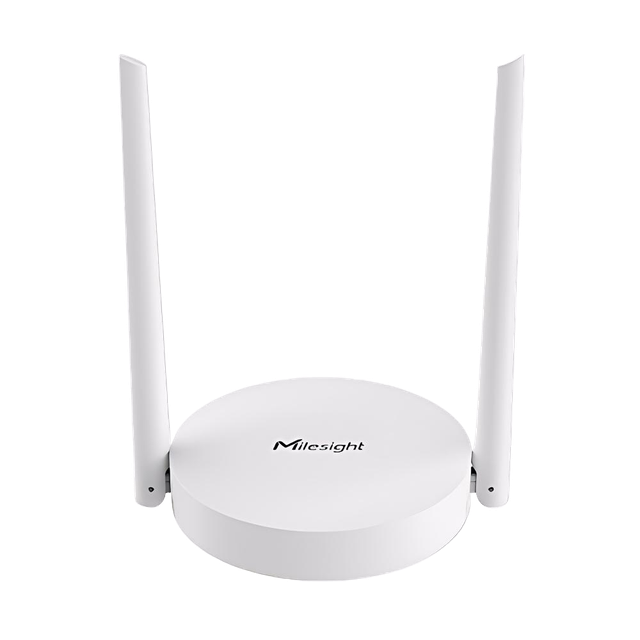
Milesight Gateway UG63-868M
Milesight UG63 is a compact LoRaWAN® gateway designed for small-scale deployments with 8-channel support and up to 2000 end-nodes. It provides Ethernet and 4G LTE backhaul, easy Wi-Fi configuration, and ensures cost-effective network coverage.
Integration Links
| Resource | Link |
|---|---|
| HARDWARIO Store | Not yet available |
| Official page | https://www.milesight.com/iot/product/lorawan-gateway/ug63 |
| User Guide | https://resource.milesight.com/milesight/iot/document/ug63-user-guide-en.pdf |
| Datasheet | https://resource.milesight.com/milesight/iot/document/ug63-datasheet-en.pdf |
Connectivity
| Type | Value |
|---|---|
| Wi-Fi | Connect to the SSID shown on the device label |
| Access URL | http://192.168.1.1 |
| Login | admin / password |
Network configuration
Initial Setup:
- Power up the gateway via USB-C
- Connect to the gateway's Wi-Fi network (SSID is shown on the device label)
- Open web browser and go to http://192.168.1.1
- Log in with: admin / password
Network Setup:
- Navigate to WAN → Connection Type
- Choose one of the following:
- DHCP Client – Gateway automatically receives IP address from your router
- Static IP – Manually configure IP address
- Connect gateway to your LAN network via Ethernet cable
- If using DHCP, find the assigned IP address in Status → Ethernet
Final Steps:
- After configuration, disable Wi-Fi for security:
- Go to Settings → WLAN → Enable = false
- Reconnect to gateway using the assigned IP address
LoRaWAN Network Options
For information about supported LoRaWAN network server platforms, see 👉LoRaWAN Network Options
Packet forwarding
Choose one of the following options based on your setup:
Option 1: Embedded NS (Standalone)
Best for: Users without external application server
| Setting | Value |
|---|---|
| Enable | True |
| Type | Embedded NS |
This built-in network server allows you to manage sensors directly through the gateway's web interface.
Option 2: Chirpstack v4 (Local Server)
Best for: Users with local Chirpstack installation
| Setting | Value |
|---|---|
| Enable | True |
| Type | Chirpstack-v4 |
| Server address | Your Chirpstack server IP (e.g., 10.0.0.52) |
| MQTT port | 1883 |
| Region ID | eu868 |
Option 3: The Things Stack (Cloud)
Best for: Cloud-based IoT platform users
| Setting | Value |
|---|---|
| Enable | True |
| Type | Semtech |
| Server Address | hardwario-com.eu1.cloud.thethings.industries |
| Port up | 1700 |
| Port Down | 1700 |
| Data Retransmission | False |
LNS & CUPS
What is this?
- LNS (LoRaWAN Network Server) – Manages communication between gateway and sensors
- CUPS (Configuration and Update Server) – Automatically configures and updates your gateway
Setup Steps:
- In gateway web interface, go to Packet Forwarder → General
- Set Destination to Basics Station
LNS Configuration:
| Setting | Value |
|---|---|
| URI | wss://hardwario-com.eu1.cloud.thethings.industries:8887 |
| CA File | Download from TTI root certificates, rename .pem to .trust |
| Client Key File | Upload tc.key file from your The Things Stack account |
CUPS Configuration:
| Setting | Value |
|---|---|
| URI | https://hardwario-com.eu1.cloud.thethings.industries:443 |
| CA File | Same as above |
| Client Key File | Upload cups.key file from your The Things Stack account |
Power supply
| Type | Value |
|---|---|
| Power | USB-C |
Technical Specifications
| Parameter | Value |
|---|---|
| Hardware System | |
| CPU | Dual-core 240 MHz, 32-bit Xtensa® LX7 |
| Memory | 8 MB PSRAM |
| Flash | 16 MB |
| LoRaWAN® | |
| Channels | 8 (half-duplex) |
| Antenna | 1 × External |
| Frequency | CN470 / IN865 / EU868 / RU864 / US915 / AU915 / KR920 / AS923-1&2&3&4 |
| Tx Power | Max. 27 dBm |
| Sensitivity | -140 dBm @292bps |
| Protocol | V1.0.3 Class A/C |
| Supported Devices | ~2000 |
| Advanced Features | Packet filter, Retransmission |
| Interfaces | |
| Ethernet | 1 × RJ45 (10/100 Mbps, Auto) |
| Cellular (opt.) | 4G LTE Cat1/GSM |
| Wi-Fi | 802.11 b/g/n (2.4 GHz, AP mode) |
| USB | 1 × USB-C (power/console) |
| Buttons | Reset |
| LED | System, LTE |
| Network | HTTP(S), MQTT, VPN, OpenVPN client |
| Config/Update | Web, API, DeviceHub |
| Power | |
| Supply | 5V/2A (USB-C) / 5–12V DC / PoE splitter |
| Consumption | 1.3 W typ., 3.1 W max |
| Physical Characteristics | |
| Dimensions | Ø115 × 21 mm (excl. antenna) |
| Weight | 140 g (non-cellular), 158 g (cellular) |
| Housing | PC+ABS, White |
| Ingress Protection | IP30 |
| Installation | Desktop / Wall / Ceiling |
| Operating Temp | -20°C ~ +50°C |
| Humidity | 0–95% RH (non-cond.) |
| Approvals | CE, FCC |