Milesight Field Tester FT101
Milesight FT101 is a portable LoRaWAN® network testing device designed for signal assessment and optimization. It features an octa-core processor running Android 12.0, supports all standard LoRaWAN® frequency bands, and provides up to 8 hours of continuous operation. The device is ideal for evaluating network quality, identifying optimal deployment locations, and comprehensive field testing of LoRaWAN networks.
Integration Links
Retrieving Device Keys
First, identify the unique identification credentials of your FT101.
- Power on the device and open the Field Tester application
- If the device is NOT registered: The Device EUI and Application Key will be visible on the home screen
- Navigate to Settings > LoRaWAN Settings to record the Application EUI (8-bit code, sometimes labeled as Join EUI)
- If the device IS registered: Go to Settings > Basic Information to find:
- Device EUI (8-bit code)
- Application Key (16-bit encryption key)
The AppEUI (Join EUI) is fixed: 24E124C0002A0001
DevEUI (Device Extended Unique Identifier) is unique for each device and can be found printed on the device label.
Device Configuration
Before connecting to the network, ensure the local settings are correct.
- Navigate to LoRaWAN Settings in the Field Tester app
- Frequency Plan: Select EU868 (standard for Europe/Czech Republic)
- Save: Tap the Save button to apply changes
Additional Configuration Options
- Configurable Tx power, reporting interval (6-60s), frequency band, and spreading factor
- Mock sensor mode to simulate different Milesight devices
- GPS coordinate recording during field tests
LNS Registration (Server-Side)
This process occurs within your LoRaWAN Network Server interface (e.g., TTN, ChirpStack, or Milesight IoT Cloud).
Registration Steps
- Create Application: Create a folder or container (e.g., "Field_Testing")
- Add Device:
- Name: Assign a label (e.g., FT101-Tester)
- Device EUI: Enter the code retrieved from the tester
- Connection Settings:
- Join Mode: Select OTAA
- LoRaWAN Version: Select v1.0.3
- Regional Parameters Revision: Select RP001 Regional Parameters 1.0.3
- Insert Keys: Paste the App EUI (Join EUI) and App Key from the retrieval step
- Confirmed Data: Ensure the server is set to respond to confirmed uplinks (enabled by default on standard LNS)
- Save: Confirm the registration in the LNS
For information about supported LoRaWAN network server platforms, see 👉LoRaWAN Network Options
Network Activation (Join)
Monitor the Network Status in the top bar of the home screen.
- Success: Status changes to "Connected"
- Troubleshooting: If the device still displays "Not connected to the gateway" after several minutes:
- Restart the application (press the center button to open the task manager and close the app)
- Distance: Verify you are within gateway range via the LNS logs
- Key Errors: Check for typos in the App Key (e.g., confusing '0' with 'O')
- Antenna: Ensure the LoRa antenna is securely tightened
Core Functions
| Function | Description | Objective |
|---|---|---|
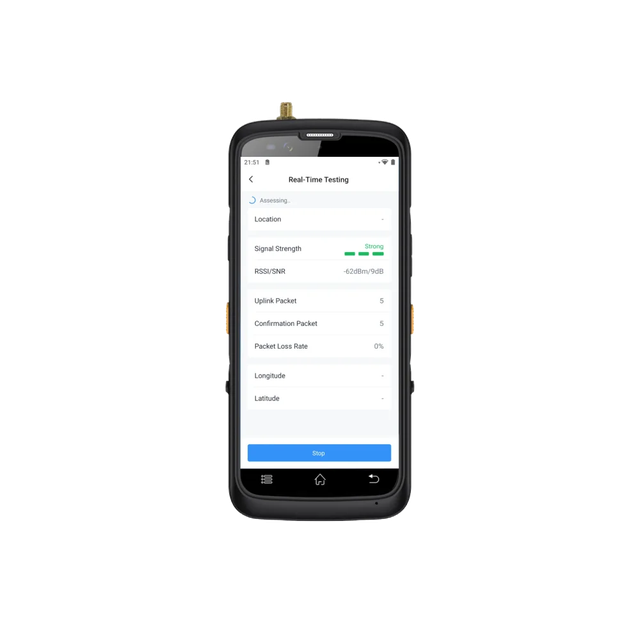
| Real-time Testing | Displays instant RSSI and SNR values for your current position | Immediate verification of network status at your exact location |
| Signal Evaluation | Tests various combinations of Data Rate (DR) and Spreading Factor (SF7–SF12) | Identifying the most stable SF/DR settings for reliable operation |
| Noise Scan | Scans the spectrum (863–870 MHz) to measure background radio interference | Identifying "radio smog" that could block sensor communication |
| Coverage Mapping | GPS-tracked signal quality mapping | Identifying optimal deployment locations |
| Ping-pong Simulation | Simulates bidirectional communication | Testing downlink capabilities |
Testing Features
- Multiple testing modes: signal quality (RSSI/SNR), coverage mapping, noise scanning, ping-pong simulation
- Test results stored on 64GB internal storage
- Exportable via USB Type-C or microSD card (up to 256GB)
- Insert a microSD card to automatically save measurement results to a CSV file for PC analysis
Interpreting Noise Scan Results
A lower RSSI value (more negative) indicates a cleaner environment.
| RSSI Value | Environment | Recommendation |
|---|---|---|
| -110 dBm to -120 dBm | Excellent / Clean | Ideal for gateway installation |
| -90 dBm to -100 dBm | Moderate Interference | Functional, but range may be reduced |
| Higher than -85 dBm | Heavy Interference | Critical. Relocate gateway or change frequency |
Additional Capabilities
Milesight ToolBox can be installed to configure other Milesight sensors via built-in NFC reader (ISO/IEC 14443A, 1-3 cm reading distance).
Initial Setup
- Connect to Wi-Fi and enable Location Services in Android Settings
- Grant location permission to Field Tester App for GPS tracking
LoRaWAN Configuration
| Parameter | Value |
|---|---|
| LoRaWAN version | 1.0.3 |
| Mode | OTAA / ABP |
| Sensitivity | -137 dBm @ 125kHz, SF=12 |
| Tx Power | 19 dBm (470MHz) / 16 dBm (868MHz) / 22 dBm (915MHz) |
Power Supply
| Type | Value |
|---|---|
| Power | 4.3V/4300mAh lithium-ion rechargeable battery |
| Charging | 5V ⎓ 2A via USB Type-C |
| Active use | ~8 hours continuous operation |
| Standby | >300 hours (~7 days) |
Technical Specifications
| Parameter | Value |
|---|---|
| Wireless Transmission | |
| Protocol | LoRaWAN® V1.0.3 |
| Antenna | 1× 50Ω SMA female connector (external) |
| Frequency | CN470 / IN865 / EU868 / RU864 / US915 / AU915 / KR920 / AS923-1&2&3&4 |
| Tx Power | 19 dBm (470MHz) / 16 dBm (868MHz) / 22 dBm (915MHz) |
| Sensitivity | -137 dBm @ 125kHz, SF=12 |
| Connectivity | |
| Wi-Fi | 802.11 b/g/n (2.4GHz), 802.11 a/n/ac (5GHz) |
| Bluetooth | 4.0 (BLE) |
| GPS/GNSS | GPS / GLONASS / Beidou / Galileo |
| Display & Interface | |
| Screen | 5.72" TP LCD Touch Screen, 1440 × 720 resolution |
| Operating System | Android 12.0 |
| Processor | Octa-core MTK6762, 2 GHz |
| Memory | 4GB RAM + 64GB ROM |
| Storage Expansion | microSD up to 256GB |
| Configuration | |
| NFC | ISO/IEC 14443A, 1-3 cm reading distance |
| USB | Type-C (USB 3.0) for power and data |
| Features | |
| Testing Modes | Signal quality (RSSI/SNR), Coverage mapping, SF analysis, Noise scanning, Ping-pong simulation |
| Geolocation | GPS recording of test points |
| Reports | Comprehensive export capabilities |
| Physical Characteristics | |
| Power Supply | 4.3V/4300mAh Li-ion rechargeable |
| Battery Life | ~8 hours active / >300 hours standby |
| Operating Temp | -10°C ~ +50°C |
| Storage Temp | -20°C ~ +60°C |
| Humidity | 95% RH (non-condensing) |
| Ingress Protection | IP65 |
| Dimensions | 178 × 83 × 17 mm |
| Weight | 242 g (without antenna) |
| Approvals | CE, FCC, RoHS |