Hardware Description
This article describes the hardware configuration of the EMBER Hotspot.
EMBER Hotspot Overview
The EMBER Hotspot is based on the RBM33G platform from MikroTik.
It is equipped with a LoRaWAN card and can optionally include an LTE modem.
The enclosure and connectors are water-proof and dust-proof, providing IP67 protection.
Connector Layout
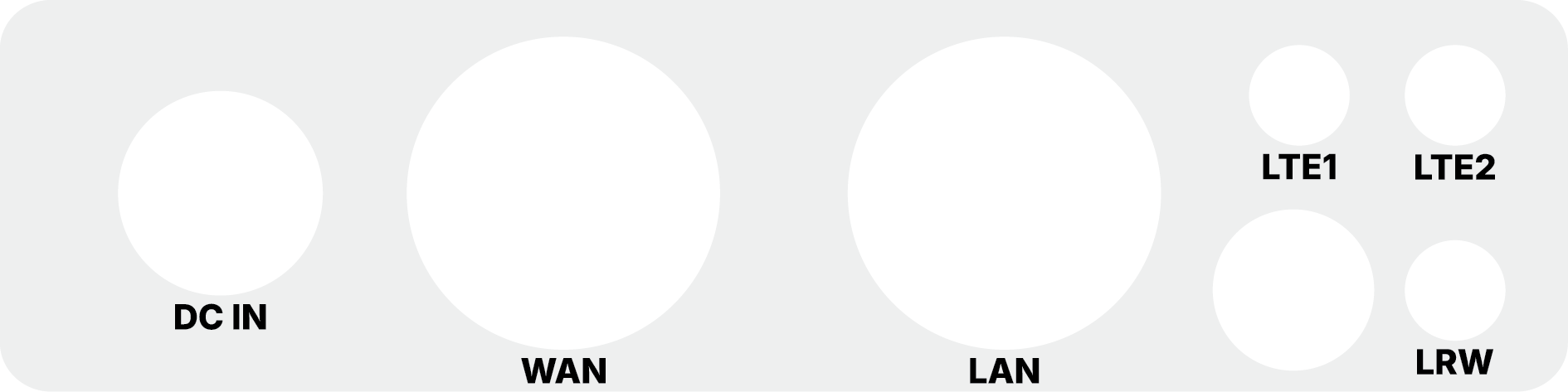
External Connectors & Antennas
The device is equipped with high-quality connectors for power, networking, and wireless communication.
Antennas
- LRW (LoRaWAN): One N-type connector for an optional external LoRa antenna.
- LTE1 & LTE2: Two connectors for LTE antennas (Main and Diversity). Used if the LTE modem is installed to provide cellular backhaul (supports 2G / 3G / 4G).
EMBER ships with two internal antennas
Every EMBER leaves the factory with two antennas fitted inside the enclosure and already connected:
one for LoRaWAN (on the LoRa card's RFIO u.FL connector) and one for LTE. The radio therefore
always has an antenna on it when you unbox the gateway: it is safe to power on, and nothing has to be
screwed on before you start.
The package contains the 24 V DC power adapter and no loose antennas, see Ordering Codes.
Switching to an external antenna
The LRW, LTE1 and LTE2 connectors on the enclosure are there for optional external antennas, worth fitting when you need more range than the internal antenna delivers, or when the gateway is mounted somewhere that shields it. The internal antenna occupies the card's u.FL connector, so switching over is a manual step:
- Disconnect power.
- Open the enclosure.
- Unplug the internal antenna from the card's u.FL connector (
RFIOon the LoRa card) and plug the pigtail of the matching bulkhead connector (LRW for LoRaWAN) in its place. - Close the enclosure and screw the external antenna onto the connector.
- Update
antenna-gainin RouterOS to the gain of the antenna now in use, see Antenna Gain & Output Power. Left at the value for the old antenna, the gateway radiates above or below the legal EIRP limit.
Close the enclosure carefully, because the IP67 rating depends on its seal. And never power the gateway with the LoRa card's u.FL connector left empty: transmitting into an open connector can damage the card's power amplifier.
If you have the enclosure open and need to tell the cards apart: the LoRa card has a single u.FL
connector (RFIO), while the LTE card has two (MAIN and AUX).
Power and Data
- DC IN: Circular industrial connector for external 24 V DC power supply.
- LAN (Ethernet): Used for local configuration, device management, and troubleshooting.
- WAN (Ethernet + PoE): Primary interface for internet connectivity. This port also supports Passive PoE IN for powering the device.
Network Interfaces
The EMBER Hotspot provides two metallic RJ45 Ethernet ports (10/100/1000 Mbit/s) hidden behind waterproof cable glands:
-
LAN (Located on the right side of the device)
- Local configuration
- Device management
- Troubleshooting
-
WAN (Located on the left side of the device)
- Internet connectivity to the cloud
- Used for PoE power input
Power Supply Options
The device can be powered by:
- 24 V DC power adapter (via DC IN)
- 24 V DC power supply (via DC IN)
- 24 V DC passive PoE (Power over Ethernet) via the WAN port
For outdoor installations, the EMBER Hotspot must be mounted with connectors facing down to maintain its IP67 rating and prevent water accumulation.